
Enterprise applications require both exact search (equality, range predicate) and pattern search (LIKE or text search). The B-Tree based indexes in databases help perform an exact search in milliseconds. Pattern search is a whole different problem. Predicates of patterns (name LIKE "%turin%") will scan the whole index — unsuitable for application use. Recognizing the need for speed, we've introduced a TOKENS() functions in Couchbase 4.6 which retuns an array of tokens from each field or document. We then index the array using the array indexing in Couchbase N1QL. This transforms the pattern search problem to a simple equality look up, improves the performance by orders of magnitude.
Introduction
Whether you’re booking a hotel in Turin or Timbuktu, Milan or Malibu, you need to search based on various criteria: location, dates, rooms, number of people, their age and more. The numerical requirements (number of rooms, number of people in the party), date ranges (check-in and checkout dates) are exact predicates. The target place to visit could be a search within a city name, region name, nearby places, or interesting landmarks.
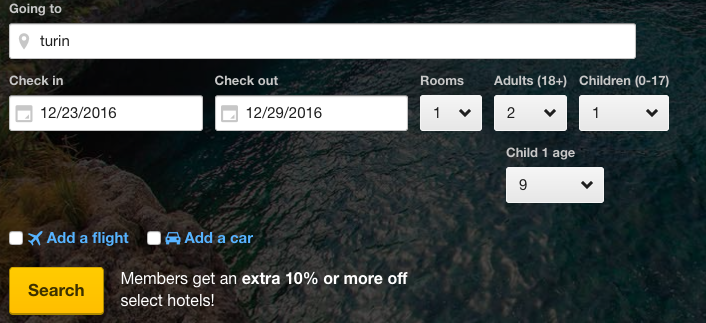
Here is the problem.
How do you make this query run really, really quickly?
How do you get thousands of users searching and buying your product and service concurrently?
Search is a broad term. So, we divide searches into distinct types.
Exact search with one or more predicates.
Pattern search to find a word or a pattern within a larger string.
Fuzzy search — text search with a lot of text data.
Of course, all of these search operations have to come back with results in milliseconds and not seconds.
In Couchbase:
For exact searches, you can use B-tree- or skip-list-based global secondary indexes with a simple or composite index to achieve your goals.
For full-text search, which requires heavy text processing — stemming, scoring, and more — you can use Couchbase full-text search (FTS).
The hotel search problem doesn’t fall nicely into either category completely. Exact predicates require exact index; search predicates require FTS index. Using only index scans, you’ll get too much data, and you’d need filter further. On the other hand, if you search using full-text index, you’ll need to filter further for dates, rooms, etc. This second level of filtering will slow things down significantly.
Real world problems like you saw above are not always clean cut. You want the exact search for numerical and date range; you want the string search with smaller data like city, neighborhood, region.
Here is the problem. How do you make this query run really, really quickly? How do you get thousands of users searching and buying your product and service concurrently?
Let’s use sample Hotel documents in the Couchbase travel-sample data set to explore the use case.
Now, let’s see some common questions from your application and how these questions can be translated to queries.
1. Find all the hotel information for "Medway Youth Hostel"
* This is an exact search of the predicate (hotel.name = "Medway Youth Hostel")
2. Find all the hotels in "Medway", "United Kingdom"
* This is an exact search with the predicate: ( hotel.country = “United Kingdom”
AND hotel.city = “Medway” )
3. Find all the hotels liked (in the field public_field) by the a person with a name (first or last) Vallie
* public_likes is an array of field. It has names of the peopel who liked the hotel.
* This is a pattern search. We're looking for a first name or last name Vallie.
So we use the array predicate to search through array elements. To make this search faster, we create an array index on public_likes. This index scan will still fetch all the elements from the index and apply the LIKE "%vallie%" on top of it.
4. Find all the hotels that mention architecture anywhere in the document. This anywhere -- could be in keyname (attribute name), any value — in name, description, reviews, etc.
This has a pattern search. Search for architecture anywhere in the document is a pattern search.Index: This query can use a primary index.
While this query works, it takes 12.13 seconds to find the 41 documents which have the word architecture somewhere in the document. Too slow and too expensive.
Here is where the TOKENS come into the picture. TOKENS() function takes a JSON document or an expression, analyzes all of name value pairs, arrays, objects and returns an array of values of basic types: numeric, strings, boolean, null.
Once we get this array, we can use the array indexing, to index the result of TOKENS and query them:
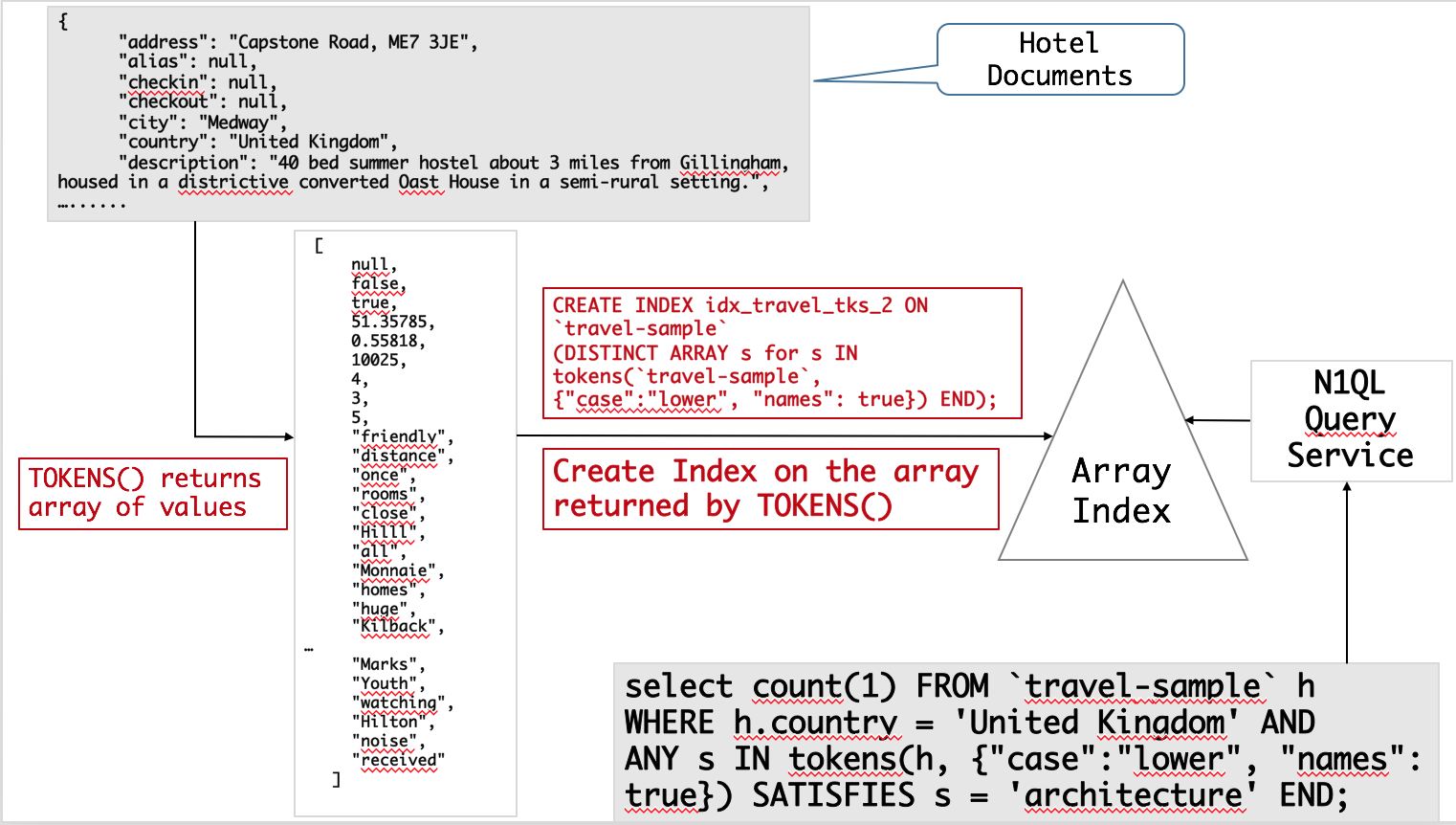
Let’s look at the query plan. It chose the tokens right index and more importantly, the predicates were pushed correctly into index scans (reported here as spans). The appropriate index is selected and the predicate looking for architecture is pushed down to index scan.
Finally, let’s put all of this together to answer this question: Find all the hotels in United Kingdom which have vacancies and with a website.
We can check for (country = ‘United Kingdom’ and vacancy = true) easily via composite index.
Having a “website” needs to be defined well.
When you get information from hotels, unless you go through a ETL process to save the information in an exact field and format, you’d have this information anywhere in the hotel document.
Problem: You’d need to search in every field name, every object, every array.
In this case, we push down all of the predicates to the index scan.
The query runs in about 233 milliseconds!
TOKENS() Function
This function is explained in detail in Couchbase documentation. The important thing to note is that first expression passed into token can be anything: constant literal, simple JSON value, JSON key name or the whole document itself.
TOKENS (Expression, Options)
You can invoke TOKENS() simply with the expressions or with the option. The function always returns an array of tokens it extracted for the given (implied) options.
TOKENS(address)
This returns an array of values including the attribute (key) names. It retrieves the data in their basic types and returns
Options can take the following options. Each invocation of TOKENS() can choose one or more of the options, passed in as JSON.
{"name": true}: Valid values are true or false. Default is true.
{"case":"lower"}: Valid values are "upper" and "lower". Default is neither — return the case in the data.
{"specials": true}: Preserves strings with special characters such as email addresses, URLs, and hyphenated phone numbers. The default is false.
Let's use all of the options on TOKENS() to see what it produces.
With names set to true, you'll get the field name, in this case info.
With specials set to true, you'll get delimited words as well as special works like keshav@couchbase.com or @rkeshavmurthy as a single word to index.
With case set to lower, all of the results will be in the lower case
Let's look at an example usage on the travel-sample data.
In this case, TOKENS() converted all of the URL data into UPPER case and added the full URL in addition to delimited words.
Use {"case":"lower"} or {"case":"upper"} to have case insensitive search. Index creation and querying can use this and other parameters in combination. As you saw in the examples, these parameters should be passed within the query predicates as well. The parameters and values have to match exactly for N1QL to pick up and use the index correctly.
Here is an example of how you can create the index and use it your applicaiton.
Summary
Couchbase 4.6 has introduced a new way to split the JSON document into simpler values using TOKENS(). Using the flexible array indexing in Couchbase, you can now create secondary indexes for scalar and array values. This is a high-performance alternative to the LIKE predicate. Its performance is so much more likable.
References
Couchbase : http://www.couchbase.com
Couchbase Full Text Search: http://developer.couchbase.com/documentation/server/current/fts/full-text-intro.html
SPLIT and CONQUER: https://dzone.com/articles/split-and-conquer-efficient-string-search-with-n1q
A Couchbase Index Technique for LIKE Predicates With Wildcard: https://dzone.com/articles/a-couchbase-index-technique-for-like-predicates-wi
Comments
Post a Comment