
Six thousand years ago, the Sumerians invented writing for transaction processing - Gray and Reuter
By any measure, MongoDB is a popular document-oriented JSON database. In the last dozen years, it has grown from its humble beginnings of a single lock per database to a modern multi-document transaction with snapshot isolation. MongoDB University has trained a large number of developers to develop the MongoDB database.
There are many JSON databases now. While it's easy to start with MongoDB to learn NoSQL and flexible JSON schema, many customers choose Couchbase for performance, scale, and SQL. As you progress in your database evaluation and evolution, you should learn about other JSON databases. We're working on an online training course for MongoDB experts to learn Couchbase easily. Until we publish that, you'll have to read this article. :)
If you know RDBMS like Microsoft SQL Server and Oracle, we have easy to follow courses to learn do the mapping of your database knowledge to Couchbase with these two courses:
Summary
MongoDB and Couchbase have many things in common. Both are NoSQL distributed databases, use the JSON model, have high-level query languages with support for select-join-project operations, have secondary indexes, have an optimizer that chooses the query plan automatically, and support intra-cluster and inter-cluster replication.
As you'd expect, there are differences. Some are more significant than others. Couchbase is designed to be distributed from the get-go. For example, the data container Bucket is always distributed — nothing to share. Simply add new nodes and the system will automatically distribute. Intra cluster replication requires no new servers - simply set the number of replicas and you're all set. From the developer interaction perspective, the big difference is the query language itself - MongoDB has a proprietary query language and Couchbase has N1QL - SQL for JSON. MongoDB uses its B-Tree-based index for search as well and recently released $searchbeta for the Atlas service using Apache Lucene; Couchbase has a built-in Full-Text Search.
Hight-Level Topics:
- Resources
- Architecture
- Database Objects
- Data Types
- Data Model
- SDK
- Query Language
- Indexes
- Optimizer
- Transactions
- Analytics
Resources
MongoDB | Couchbase | |
Docs | ||
Forums | ||
Latest Version (April 2020) | 4.2.6 | 6.5.1 |
License | https://www.mongodb.com/licensing/server-side-public-license/faq | |
Query Language |
Architecture
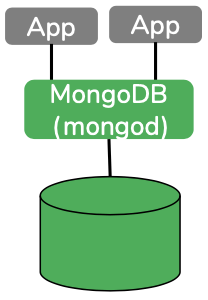 MongoDB: Simply install and use the mongod on your laptop with the right parameters; you're up and running. A single process to deal with the whole database. This has changed a little bit in 4.2 where you'd need mongos to run your transactions. All of the MongoDB features (data, indexing, query) are available here, except full-text search, which is available only on the Atlas service.
 Couchbase: Couchbase is different. It has abstracted each of the services (data, index, query, search, analytics, eventing) and you have the option to choose which of the features you'd want to run on your instance to optimize the resources. A typical installation has data, index, and query. Search, eventing, and analytics will run on your laptop - install and use them per your use case.
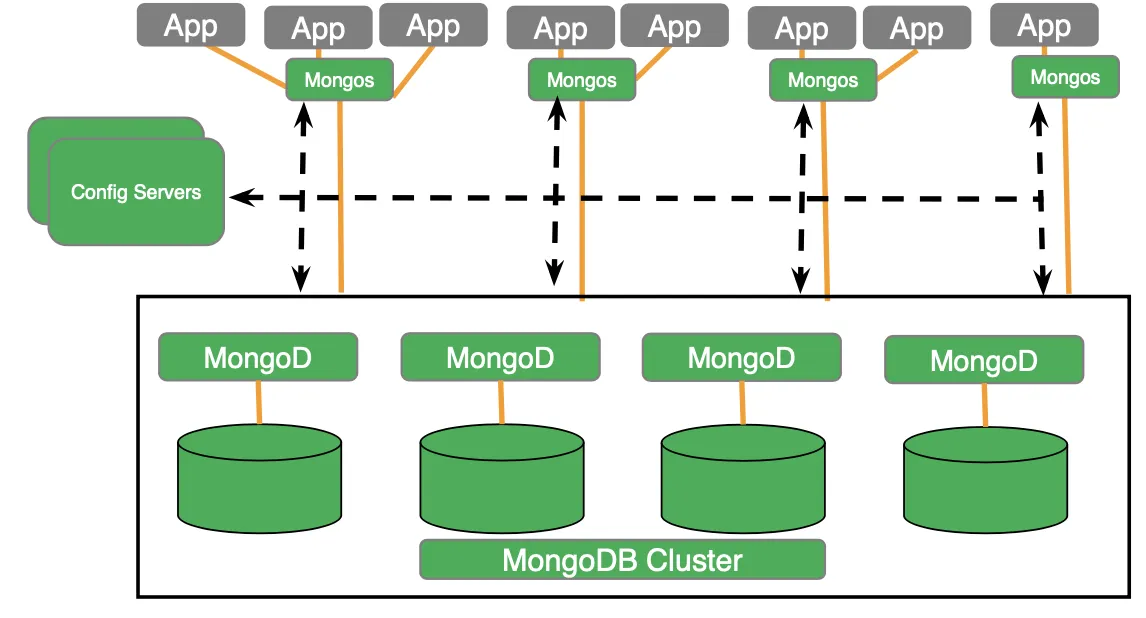
Cluster deployment: As with most NoSQL databases, both MongoDB and Couchbase can scale out. In MongoDB, you can scale by sharding the collection into multiple nodes. You can shard by hash or range. Without explicit shard, each collection remains in a single shard. The config servers store the metadata and configuration for the cluster.MongoDB is uniformly distributed and Couchbase is multi-dimensionally distributed. Mongod process (service) manages data, index, and query on every shard (node) whereas Mongos does the distributed query processing and merging from intermediate results and does not manage any data or index. Mongos acts as the coordinator and mongod is the worker bee.
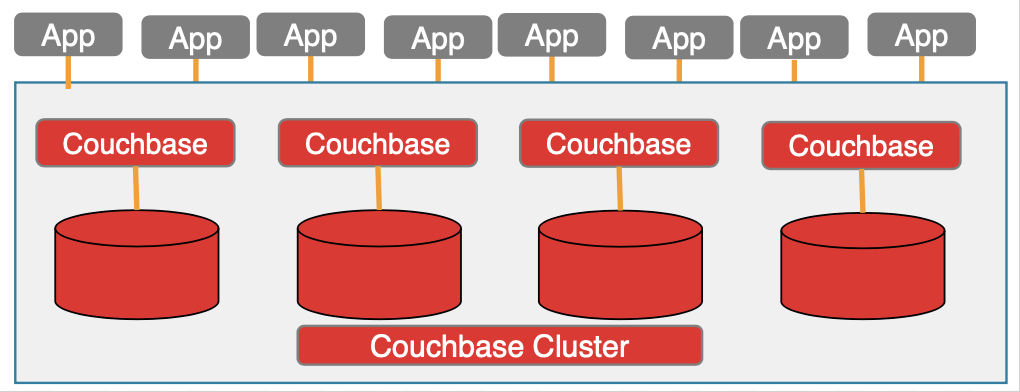
Couchbase can be deployed in a uniform distribution with each node managing the data and all services; data, index, query, analytics, and eventing. Each service is a layer in the traditional database. These services are loosely coupled — they run in different process spaces and communicate via a network, hence they can be deployed uniformly in a single node or distributed multi-dimensionally on a cluster.
The choice depends on your workload and SLAs. The data itself is stored in buckets. All the buckets are hash partitioned among given nodes — this is automatic and doesn't require any specification. When the application has the document keys, it can directly operate on the data without any intervening nodes. This is one of the key architectural differences contributing to the high performance and scale-out of Couchbase.
In addition, there are no config servers. The metadata and its management are built into the core database. The data service manages data, clusters, and replication within a Couchbase cluster. Replication between multiple Couchbase clusters is managed by XDCR. Read this article to understand the replication mechanisms in MongoDB and Couchbase: Replication in NoSQL document databases (Mongo DB vs Couchbase).
Inside the Cluster Deployment
MongoDB's cluster components and deployment are explained here, and I assume that it is prior knowledge, so I'll avoid repeating.
Couchbase deployment starts with the key-value data service. This is the (consistent) hash distributed key-value data store. This also has intracluster replication built-in eliminating any need for separate replica servers or config servers. The query service orchestrates the execution of N1QL queries using GSI (Global Secondary Indexing) and FTS (Full-Text Search) indexes as needed. FTS manages the full-text index and can be queried directly or via the N1QL query service. The Eventing function enables you to automatically trigger action (by executing Javascript function) upon data mutation. The Couchbase Analytics engine is an MPP data and query engine. It makes a copy of the data and redistributes it into its nodes, and it executes the query in parallel for the best performance possible. All of these can be seamlessly used by the rich set of APIs available in our SDKs available in all the popular languages.

Database Objects
MongoDB has a collection and database as the logical objects users have to work with. Couchbase traditionally had just the Buckets. Bucket worked both for resource management (e.g. amount of memory used), security as well as the data container. In 6.5, we introduced the notion of collection and scope as a developer preview. This bucket:scope:collection hierarchy is analogous to RDBMS's database:schema:table. This makes the database more secure and a better multi-tenant. In 6.5, without the developer preview, each bucket uses a default scope and collection, making the transition seamless.

RDBMS | MongoDB | Couchbase |
Database | Database | Bucket |
Table | Collection | Bucket Future: Collection |
Row | Document (BSON) | Document (standard JSON) |
Column | Field/Attribute | Field/Attribute |
Partition (Table/collection/bucket) | Not partitioned by default. Hash & range partitioning (sharding) is supported manually. | Partition (hash automatic) |
Notes to Developers
In MongoDB, you start with your instance (deployment) and create databases, collections, and indexes.
In Couchbase, you start with your instance and create your buckets and indexes. Each bucket can have multiple types of documents, so each document should have an application designated field for recognizing its type. {"type": "parts"}. Since each bucket can have any number of types of documents, you should avoid creating too many buckets. This also means, when you create an index you'll be interested in creating an index for each type: customer, parts, orders, etc. So, the index creation will include a WHERE clause for the document type.
Each MongoDB document contains an explicitly provided or implicitly generated document id field _id.
In Couchbase, the users should generate and insert an immutable document key for each document. When inserting via N1QL, you can use the UUID() function to generate one for you. But, it's a good practice to have a regular structure for the document key.
Data Types
MongoDB's data model is BSON and Couchbase's data model is JSON. The proprietary BSON type has some types, not JSON. JSON has string, numeric, boolean (true/false), array, object types. BSON has a string, numeric, boolean, array, object, binary, UTC DateTime, timestamp, and many other custom proprietary extensions, The most common difference is the DateTime and timestamp. In Couchbase, all time-related data is stored as string in ISO 8601 format. Couchbase N1QL has a plethora of functions to extract, convert, and calculate on the time. Full function details are available in this article.
Data Type | MongoDB | Couchbase | JSON |
Numbers | BSON Number | JSON Number | { “id”: 5, “balance”:2942.59 } |
String | BSON String | JSON String | { “name”: “Joe”,”city”: “Morrisville” } |
boolean | BSON Boolean | JSON Boolean | { “premium”: true, ”pending”: false} |
datetime | Custom Data format | JSON ISO 8901 String with extract, convert and arithmetic functions | { “soldate”: “2017-10-12T13:47:41.068-07:00” } MongoDB: { “soldate”: ISODate(“2012-12-19T06:01:17.171Z”)} |
spatial data | GeoJSON | Supports nearest neighbor and spatial distance. | “geometry”: {“type”: “Point”, “coordinates”: [-104.99404, 39.75621]} |
MISSING | Unsupported | MISSING | |
NULL | JSON Null | JSON null | { “last_address”: null } |
Objects | Flexible JSON Objects | Flexible JSON Objects | { “address”: {“street”: “1, Main street”, “city”: Morrisville, “zip”:”94824″}} |
Arrays | Flexible JSON Arrays | Flexible JSON Arrays | { “hobbies”: [“tennis”, “skiing”, “lego”]} |
All About MISSING
MISSING is the value of a field absent in the JSON document or literal.
{"name":"joe"} Everything but the field "name" is missing from the document. You can also set the value of a field to MISSING to make the field disappear. Traditional relational databases use three-valued logic with true, false, and NULL. With the addition of MISSING, N1QL uses 4-value logic.
You have the following expressions with MISSING:
IS MISSING
Returns true if the document does not have a status field
FROM CUSTOMER WHERE status is MISSING;
IS NOT MISSING
Returns true if the document has a status field
FROM CUSTOMER WHERE status is NOT MISSING;
MISSING AND NULL
MISSING is a known missing quantity
null is a known UNKNOWN. You can check for null value similar to MISSING with IS NULL or IS NOT NULL expression.
Valid JSON: {“status”: null}
MISSING value
Simply make the field of any type to disappear by setting it to MISSING
UPDATE CUSTOMER SET status = MISSING WHERE cxid = “xyz232”
IS MISSING | Returns true if the document does not have a status field FROM CUSTOMER WHERE status is MISSING; |
IS NOT MISSING | Returns true if the document has a status field FROM CUSTOMER WHERE status is NOT MISSING; |
MISSING AND NULL | MISSING is a known missing quantity null is a known UNKNOWN. You can check for null value similar to MISSING with IS NULL or IS NOT NULL expression. Valid JSON: {“status”: null} |
MISSING value | Simply make the field of any type to disappear by setting it to MISSING UPDATE CUSTOMER SET status = MISSING WHERE cxid = “xyz232” |
Data Modeling
| Relationship | MongoDB | Couchbase |
| 1:1 |
|
|
| 1:N |
|
|
| N:M |
|
|
Physical Space Management
| Index Type | MongoDB | Couchbase |
| Table Storage | File system directory | File system directory |
| Index Storage | File system directory | File system directory |
| Partitioning – Data | Range and hash sharding are supported. | Hash partitioning Stored in 1024 vbuckets |
| Partitioning – Index | Tied to the collection sharding strategy since all (sub) indexes are local to each mongod node. | Always detached from Bucket Global Index (can use a different strategy than the bucket/collection) Supports hash partitioning of the indexes. Range partitioning, partial indexing is manual via partial indexes. |
SDKs
My personal knowledge of both SDKs is limited. There should be equivalent APIs, drivers, and connectors with the two products. If not, please let us know.
| SDK | MongoDB | Couchbase |
| Java | MongoDB java driver | Couchbase Java SDK, Simba & CDATA JDBC |
| C | MongoDB C Driver ODBC driver | Couchbase C SDK, Simba & CDATA ODBC |
| .NET, LINQ | Mongodb .NET provider. | Couchbase .NET provider LINQ provider |
| PHP, Python, Perl, Node.js | MongoDB SDK on all these languages | Couchbase SDK on all these languages |
| golang | Mongodb go sdk | Couchbase go sdk |
Query Language
SELECT: Mongo has multiple APIs for selecting the documents. find(), aggregate() can both do the job of simple SELECT statements. We'll look at aggregate() later in the section.
In MongoDB, providing _id is optional. If you don't provide its value, Mongo will generate the field value and save it. Providing document KEY is mandatory in Couchbase.
MERGE: MERGE operation on a set of JSON documents is often required as part of your ETL process or daily updates. MERGE statements can involve complex data sources with complex business rule-based predicates. Couchbase provides the standard MERGE operation with the same semantics. In MongoDB, you had to write a long program to do this, but then some of the set operation rules (e.g. each document should ONLY be updated once) are difficult to enforce from an application. In Couchbase, you can simply use the MERGE statement, just like RDBMS.
DESCRIBE:
JSON data is self-describing and flexible. MongoDB Schema helper is available via Compass visualization in the Enterprise Edition only.
Couchbase has INFER to analyze the understand the schema. Both the query service and the analytic service can infer schema.
- Query service INFER command.
- Analytics Service has array_infer_schema() function.
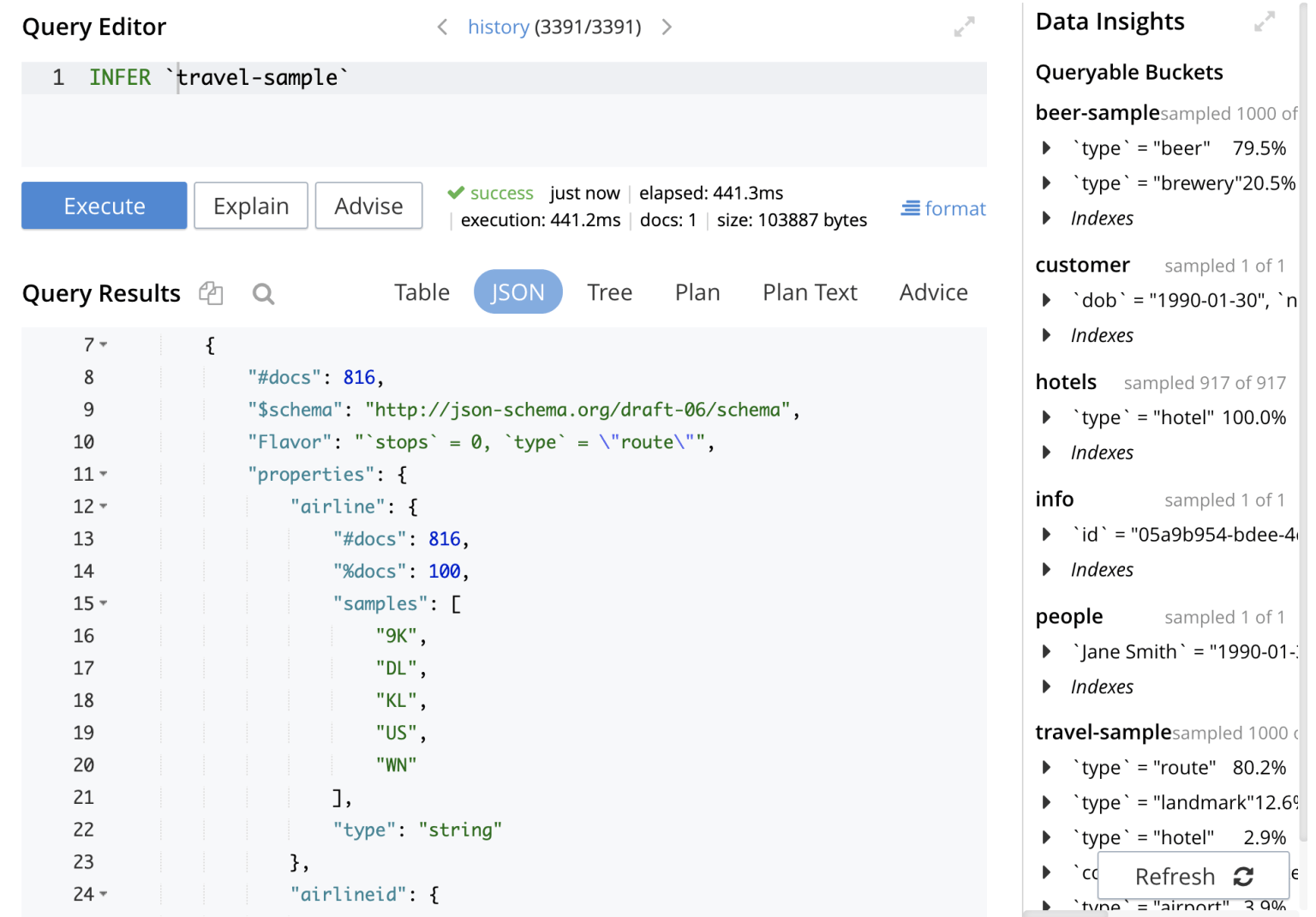
Here's the INFER output example:
EXPLAIN
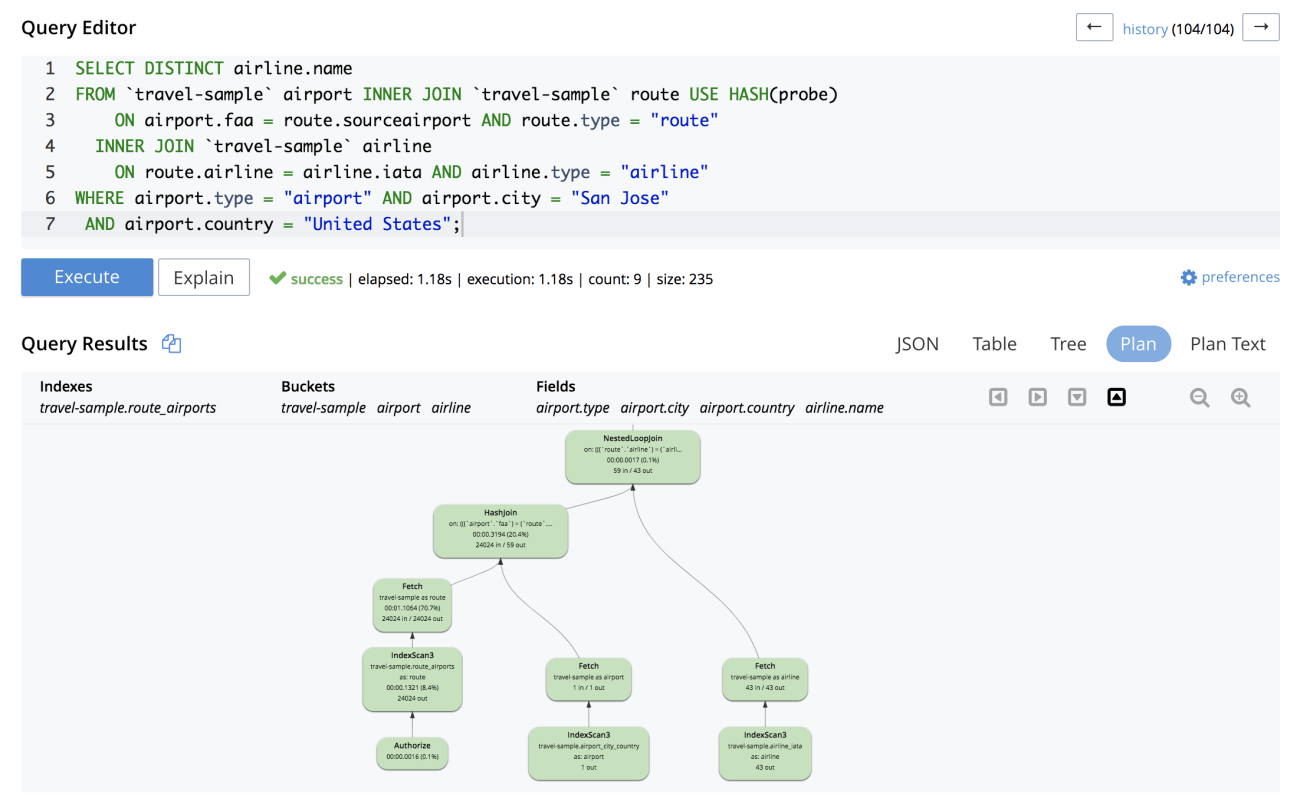
Explain tells you the query plan for each query — the indexes are chosen, the predicates and other pushdowns, join types, join order, etc. Both MongoDB and Couchbase produce explain in JSON form — a natural thing for JSON databases.
Couchbase EXPLAIN:
The query workbench also has a visual explain along with profiling (for a different query).

GROUP BY
MongoDB’s “GROUP BY” clause is part of the aggregate() API. Here’s the comparison.
Unlike SQL and N1QL, MongoDB query API has lot of implicit meaning without formal definitions. With N1QL, you’re aware of the groupings (b and c) and aggregations (SUM(a)) explicitly.
ORDER BY
OFFSET and LIMIT
These are commonly used for the offset pagination method. both Mongo and Couchbase support. However, keyset pagination is a superior approach that uses fewer resources and performs better. Mongo users $skip and $limit clauses and N1QL uses OFFSET and LIMIT. I’m unsure about the pagination optimizations done in MongoDB.
Joins are generally discouraged in NoSQL databases and MongoDB in particular. But, the real world is complex and cannot be denormalized into a single collection. MongoDB has the $lookup operator for the join and does a nested loop between one collection (potentially sharded) to another collection (cannot be sharded). In couchbase, all the buckets are partitioned (sharded). JOINs operations (INNER JOIN, LEFT OUTER JOIN, RIGHT OUTER JOIN, joins with subqueries, NEST and UNNEST) We have a detailed article showing the equivalent operations between MongoDB and JSON. I recommend you read the article Joining JSON: Comparing Couchbase and MongoDB.
| JOIN Type | MongoDB | Couchbase |
| INNER JOIN | No. $lookup is a limited left outer join on unsharded collections only. Applications have to do that and then remove the documents without the matching documents. | ON clause requires document key reference. Equi-join only |
| LEFT OUTER JOIN | Limited $lookup. Cannot join on arrays. Need to flatten arrays manually before the join. | Full left outer join including array predicates in the ON clause. |
| RIGHT OUTER JOIN | Unsupported. Must be handled in the application | Limited RIGHT OUTER JOIN support; Worked around with using other JOINs. |
| FULL OUTER JOIN | Unsupported. Must be handled in the application | Worked around with using other JOINs. |
GRANT and REVOKE
INDEXES
Below is an overview of the index capabilities of MongoDB and Couchbase. Both have a variety of indexes. Couchbase index types and usage are well documented in the article: Create the Right Index and Get the Right Performance. In addition, Couchbase has a built-in index advisor for the individual statement as well as the workload and, in addition, has the Index Advisor Service, which is updated monthly.
| Index Type | MongoDB | Couchbase |
| Primary Index | Table Scans, Primary Index | Primary Index |
| Secondary Index | Secondary Index | Secondary Index |
| Composite Index | Composite Index | Composite Index |
| Functional Index (Expression Index) | Unavailable | Functional Index, Expression Index |
| Partial Index | Unavailable | Partial Index |
| Range Partitioned Index | Range partitioned, Interval, List, Ref, Hash, Hybrid partitioned Index | Manual range partitioned using partial Index |
| ARRAY Index | 1. B-Tree based index with one array-key per index. 2. The one array key can be simple or composite (multi-key). | 1. B-tree based index with one array-key per index. 2. Array key can be composite 3. Using SEARCH(): Inverted tree based index with unlimited number of array key per index. |
| Array Index on Expressions | Unavailable | Yes |
| Objects | Yes | Yes |
Full-Text Search
MongoDB product has built-in text search support and is now experimenting with integrating Lucene on their Atlas service via the $searchbeta feature. Couchbase has a built-in full-text search indexing service that you can run on your laptop and the cluster. Again, we have a detailed article comparing the text search feature-by-feature, with examples. Couchbase 6.5 integrates the FTS with N1QL, making the querying even further.
Optimizer
A query optimizer tries to rewrite the query for better optimization, to choose the most appropriate index, to decide index pushdown, to join order, to join type, and to create a plan that the engine can execute. Each database has a specialized optimizer that understands the capabilities and quirks of the engine.
| Feature | MongoDB | Couchbase |
| Optimizer Type | Query Shape based | Rule based |
| Index selection | Query Shape based | Rule based Cost based (preview in 6.5) |
| Query Rewrite | No | Yes, limited. |
| JOIN Order | As written, procedural using the aggregation framework | User Specified (Left to Right) |
| Join Type | Nested Loop | Nested Loop Hash Join |
| HINTS | Yes. $hint | Yes. USE INDEX, USE HASH |
| EXPLAIN | $explain | EXPLAIN |
| Visual Explain | Yes | Yes. |
| Query Profiling | Yes | yes |
Transactions
NoSQL databases were invented to avoid SQL and transactions. Over time, each database is adding one, the other, or both! MongoDB has added distributed multi-document transactions with snapshot isolation. Couchbase 6.5 has added distributed multi-document transactions with read committed isolation. Couchbase 7.0 provides distributed transactions for all of the data operations: N1QL statements, document updates. From "BEGIN WORK" to "COMMIT WORK" in Couchbase, functionality will look pretty familiar to SQL developers. The Java developers will love the easy-to-use lambda to program for transactions.
| Feature | MongoDB | Couchbase |
| Index updates | Indexes are synchronously maintained | Indexes are asynchronously maintained |
| Atomicity | Single document Multi-document (in 4.2) | Single Document Multi-document (in 6.5) Multi-Statement, Multi-Operation, Multi-document (7.0) |
| Consistency | Data and indexes are updated synchronously. By default, dirty read on Data and indexes. | Data access is always consistent Indexes have multiple consistency levels (UNBOUNDED, AT_PLUS, REQUEST_PLUS) |
| Isolation | Default: Dirty read Transaction: Snapshot isolation | Optimistic locking with CAS checking Transactions: Monotonic atomic isolation |
| Durability | Durable with write majority option. | Durable with confirmation after replication |
Analytics
Couchbase Analytics is designed to bring you insights on your JSON data without ETL — NoETL for NoSQL. The JSON data in the key-value datastore is copied over to the analytics service which distributes the data into its storage. The Couchbase query service, data service is designed to handle a large number of concurrent operations or queries to run the applications. The analytics service is designed to analyze a large number of documents to bring you insights into the business. In traditional terms, the Analytics service is designed for OLAP, and the rest are designed for OLTP. MongoDB doesn’t have the equivalent analytics service. You’d have to overload your existing cluster with both OLTP and OLAP workloads. As you’ll learn, there’s no free lunch. The large scans required for analytics workload will affect the latencies of your OLTP queries. Then, you start allocating new nodes for your secondary and tertiary copies of the data on which you can do the read-workload. What will or should happen on a failover? The secondary takes over but, again, affects your OLTP workload.
There’s a second reason for a distinct service — Query processing for analytics requires a different approach than the OLTP queries. There area great set of resources for you to learn about this service, including the book by Don Chamberlin, co-inventor of SQL.
- SQL++ for SQL USERS: A TUTORIAL: https://resources.couchbase.com/analytics/sql-book
- Couchbase Analytics: Under the Hood – Connect Silicon Valley 2018: https://www.youtube.com/watch?v=1dN11TUj58c
- From SQL to NoSQL
- Beyond rows and columns: The fourth time’s the charm – Couchbase Connect 2016: https://www.youtube.com/watch?v=HVJNxgLKtbo
- NoETL for NoSQL – Real-Time Analytics With Couchbase: https://www.youtube.com/watch?v=MIno71jTOUI
- N1QL: To Query or To Analyze?
- Part 2: N1QL: To Query or To Analyze?
Summary
Databases are extraordinarily useful. They’re nuanced and are also sticky. They’re essential to civilization. Sumerians invented writing for transaction processing: to create a database out of clay tablets to keep track of taxes, land, gold, and find out information. There will be databases forever. Each database is different, whether they’re SQL databases or NoSQL databases. Not all SQL databases are the same. Not all NoSQL databases are the same. Understanding different databases enhance your organization’s flexibility and effectiveness.
Resources
- SQL++ for SQL USERS: A TUTORIAL: https://resources.couchbase.com/analytics/sql-book
- N1QL Practical guides
- Couchbase 6.5 blogs: https://blog.couchbase.com/tag/6.5/
Comments
Post a Comment