
(With SQL) Your app is sitting on a Ferrari-style compute engine.
— Lukas Eder
Over time, the database industry has realized text search and SQL are two sides of the same coin. Text search needs further query processing, query processing needs text search to efficiently filter for text patterns. The SQL databases have added text search within them, albeit for a single node SMP systems.
Couchbase Full-Text Search (FTS) is created with three main motivations:
- Transparently search across multiple fields within a document
- Go beyond the exact matching of values by providing language based stemming, fuzzy matching, etc.
- Provide the search results based on relevance
FTS achieves this on an inverted index and a rich set of query predicates : from simple word search to pattern matching to complex range predicates. In addition to the search, it supports aggregation via search facets .
In the NoSQL world, Lucene is a popular search index and so are the search servers based on Lucene: all have added SQL for their search. Couchbase introduced the full text service, Solr and Elasticsearch. Following their RDBMS cousins, Elasticsearch, Opendistro for Elasticsearch FTS and has followed up with support for search within N1QL.
The SQL Implementations of Elasticsearch with SQL and MongoDB's MQL comes with a long list of limitations.
Elasticsearch with SQL has listed its limitations here:
MongoDB's MQL's search integration comes with a long list of limitations.
- Available only on the Atlas search service, not on the on-prem product.
- Search can only be the FIRST operation within the aggregate() pipeline.
- Available only within the aggregation pipeline (aggregate()) and not in find(), insert(), update(), remove() other other operations.
The integration with its aggregate() API, comes with some limitations: It can only be the first operation in the pipeline unavailable on its on-prem database. The features we discuss in this article are in Couchbase 6.5 and above.
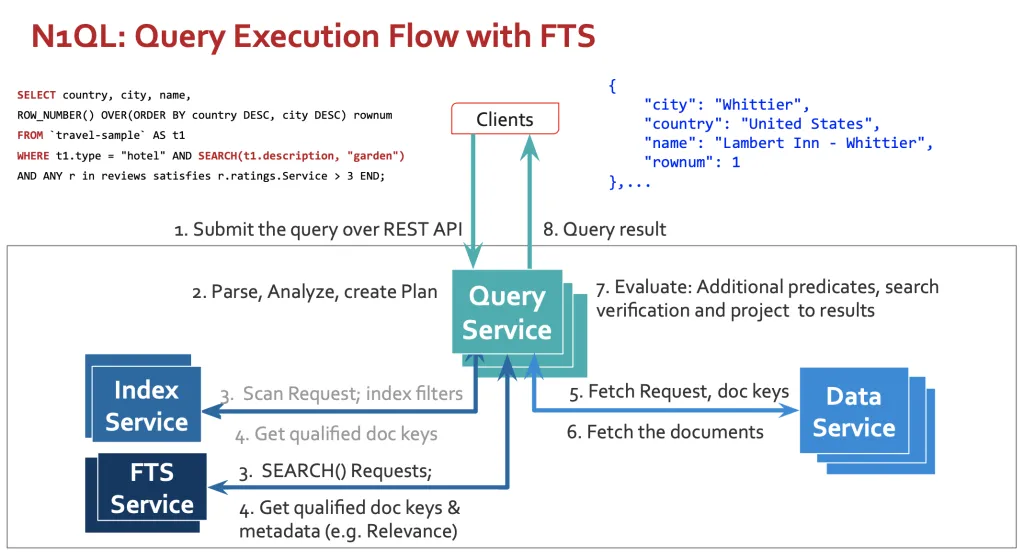
Here's an example from N1QL:
This includes the following in addition to SEARCH():
- Projection of fields from the documents: country, city, name
- Row number generation via the window function ROW_NUMBER()
- Additional scalar predicate t1.type = "hotel"
- Array predicate on reviews (ANY)
You get the FULL benefit of first-class query processing in addition to efficient search. That's not all - there's even more with N1QL. The benefits and effectiveness of SQL are well known. N1QL is SQL for JSON. The goal of N1QL is to give developers and enterprises an expressive, powerful, and complete language for querying, transforming, and manipulating JSON data.
The benefits of using with the search are the following:
- Predicates:
- FTS is great with searching based on relevance. SQL is great with additional complex query processing: complex predicates, array predicates, additional scalar
- JOIN processing
- N1QL can do INNER JOIN, LEFT OUTER JOIN, (limited) RIGHT OUTER JOIN, NEST, UNNEST
- JOINS between buckets, collections and results of subqueries.
- More than SEARCH()
- In addition to SELECT, you can use SEARCH() predicate in the WHERE clauses of INSERT, UPDATE, DELETE, MERGE statements.
- You can PREPARE these statements and EXECUTE them repeatedly and efficiently.
- You get the usual security via the RBAC roles via GRANT & REVOKE.
- Developer productivity: Write the query in SQL, the language they already know.
Let's Look at how the N1QL engine executes this. Abhinav Dangeti from the Couchbase FTS engineering has already written a great blog detailing the decision making and examples. This article is to explain this visually with additional examples in the categories mentioned above.
1. Architecture for Query Execution
We've added three important steps to query execution the query uses SEARCH() :
- The planner considers the FTS search index one of the valid access paths if search() predicate exists in the query.
- If the search index is selected, then it creates the plan by pushing down the search predicate to the FTS index.
- When the search index is selected, executor issues the search request to one of the FTS nodes (instead of the scan request to the index service)
- Before the results from the search are finalized, the query service re-verifies the search qualification of the document to the data.
2. Predicate Processing
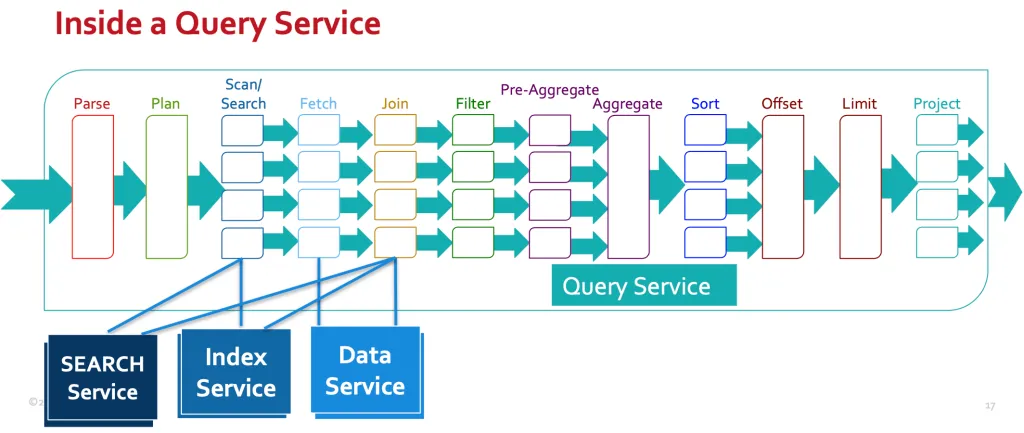
In the following query, the SEARCH() predicate (predicate-2) is pushed to the FTS search request. Every other predicate is processed by the query engine post search in the "Filter" phase - as shown in the "Inside a Query Service" figure above. This is one exception to this. When the FTS index has created an index with JSON type field (doc_config.type_field in the index definition document) is defined (in this case type = "hotel") to create the index on the subset of the document, both index selection and search pushdown exploits this predicate. Even in this case, the predicate is re-applied after the document fetch.
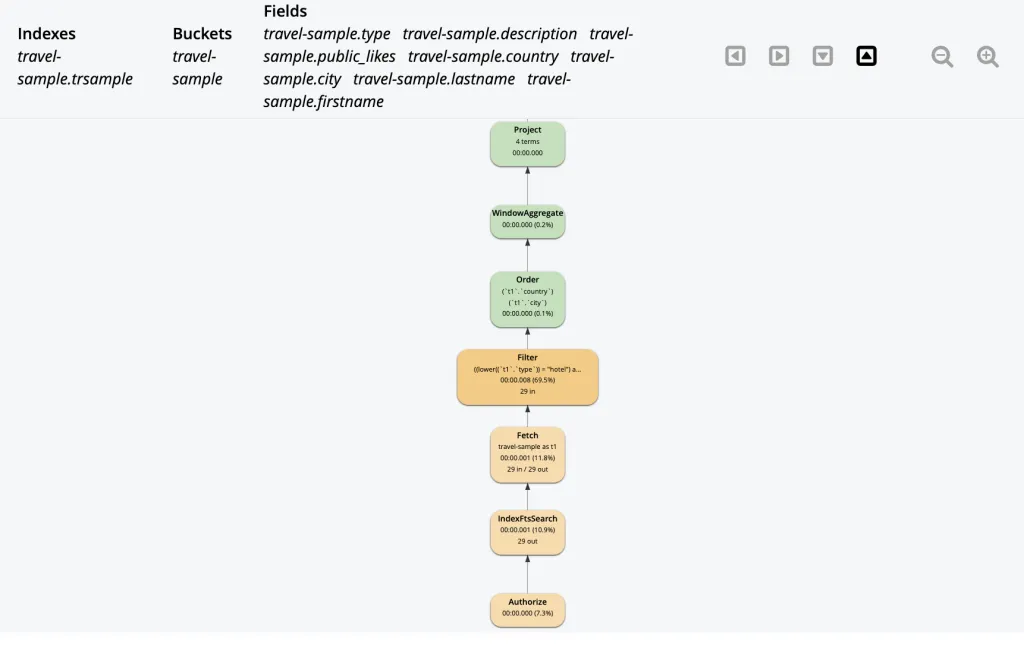
Here's an example of a query exploiting the operators and functions.
Here's the query plan for this query. IndexSearch does the FTS search request and this is layered into the query execution pipeline. Hence the query gets the benefit of all the other capabilities of N1QL. This reflects the pipeline stages in the figure above.
4. JOIN Processing
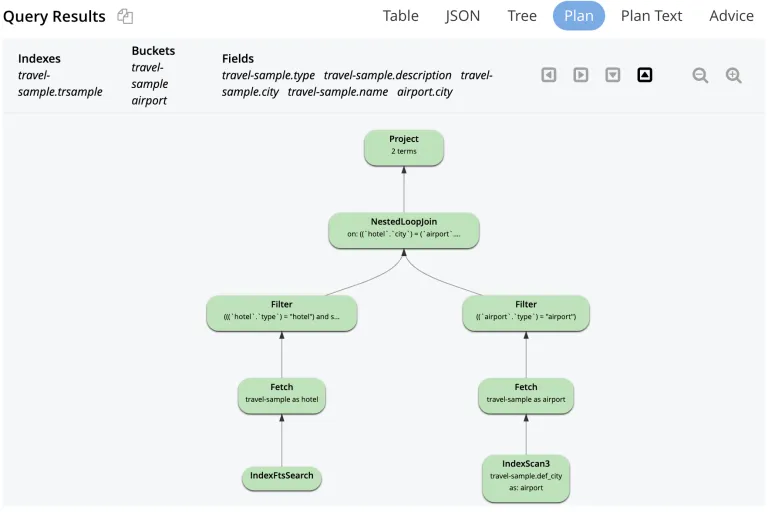
.The SEARCH() can also be used as part of the join processing. In this case, the FTS is used to find all the cities which have hotels with gardens and then join with airports.

5. Use in UPDATEs
SEARCH() can be used anywhere a predicate is allowed within other DML statements.
The examples can flow a long time. I've shown common sample examples. You use this in various SQL statements (DMLs)
Conclusion
Couchbase FTS provides a scalable, distributed text search engine. We've seamlessly layered it into N1QL in Couchbase Query service so you get the full power of queries with the full power of search. There's more innovation on this in the pipeline. Stay tuned!
Comments
Post a Comment