
SPLIT and CONQUER: Efficient String Search With N1QL in Couchbase

[Repost of my article: https://dzone.com/articles/split-and-conquer-efficient-string-search-with-n1q ]
Consider my DZone article: Concurrency Behavior: MongoDB vs. Couchbase. It’s a 10+ page article. For any application, indexing and supporting searching within the full text is a big task. The best practice for search is to have tags or labels for each article and then search on those tags. For this article, tags are:  CONCURRENCY, MONGODB, COUCHBASE, INDEX, READ, WRITE, PERFORMANCE, SNAPSHOT, and CONSISTENCY.
Let’s put this into a JSON document.
Document Key: "k3"
{
 "tags": "CONCURRENCY,MONGODB,COUCHBASE,INDEX,READ,WRITE,PERFORMANCE,SNAPSHOT,CONSISTENCY",
 "title": "Concurrency Behavior: MongoDB vs. Couchbase"
}
It's one one thing to store the tags. It's another thing to search for a tag within the string.  How do you search for the COUCHBASE tag within the tags? How do you search for a specific string within this “tags”?
In SQL, you can do the following:
SELECT title, url FROM articles WHERE tags LIKE “%COUCHBASE%”;
Query Explain: 
                "~children": [
                    {
                        "#operator": "PrimaryScan",
                        "index": "#primary",
                        "keyspace": "articles",
                        "namespace": "default",
                        "using": "gsi"
                    },
Create an index on tags, you get the following plan:
CREATE INDEX idx_articles_tags on articles(tags);
EXPLAIN SELECT title, url FROM articles WHERE tags LIKE "%COUCHBASE%";
Query Plan:
               "#operator": "Sequence",
                "~children": [
                    {
                        "#operator": "IndexScan",
                        "index": "idx_articles_tags",
                        "index_id": "ca25a044d8383f1",
                        "keyspace": "articles",
                        "namespace": "default",
                        "spans": [
                            {
                                "Range": {
                                    "High": [
                                        "[]"
                                    ],
                                    "Inclusion": 1,
                                    "Low": [
                                        "\"\""
                                    ]
                                }
                            }
                        ],

You need to use the pattern “%COUCHBASE%” because the string pattern could be anywhere within the tags string. Whether you do a primary scan (table scan) or an index scan, this query is going to be slow on a large data set, as it has to scan the entire data set or the index to correctly evaluate the predicate.  
Two observations here: 
  1. While the predicate "%COUCHBASE%" looks for the word COUCHBASE anywhere in the string, it's usually in there as a separate word, tag or label.
  2. Applications and users typically search for the whole word.
Now, let's see how N1QL makes this fast, easy, and efficient.
Let’s first look at the SPLIT() function. SPLIT() can take any string and a separator, and return array strings.
SELECT SPLIT("CONCURRENCY,MONGODB,COUCHBASE,INDEX,READ,WRITE,PERFORMANCE,SNAPSHOT,CONSISTENCY", ",");
    "results": [
        {
            "$1": [
                "CONCURRENCY",
                "MONGODB",
                "COUCHBASE",
                "INDEX",
                "READ",
                "WRITE",
                "PERFORMANCE",
                "SNAPSHOT",
                "CONSISTENCY"
            ]
        }
    ]
Once you have an array, you can query the data based on array predicates.
Note: System:dual always has a single document with null in it.
SELECT COUNT(*) boolcount
FROM system:dual
WHERE 
ANY s in SPLIT("CONCURRENCY,MONGODB,COUCHBASE,INDEX,READ,WRITE,PERFORMANCE,SNAPSHOT,CONSISTENCY", ",") 
    SATISFIES s = "COUCHBASE" 
END;
[
  {
    "boolcount": 1
  }
]
Let’s try to find something that doesn’t exist. Since the predicate is evaluated to be False, nothing is returned.
SELECT COUNT(*) boolcount
FROM system:dual
WHERE 
ANY s in SPLIT("CONCURRENCY,MONGODB,COUCHBASE,INDEX,READ,WRITE,PERFORMANCE,SNAPSHOT,CONSISTENCY", ",") 
    SATISFIES s = "TRANSACTION" 
END;
[
  {
    "boolcount": 0
  }
]
We can convert the tags string into an array of strings and then lookup the value in the array instead of searching within the whole string.
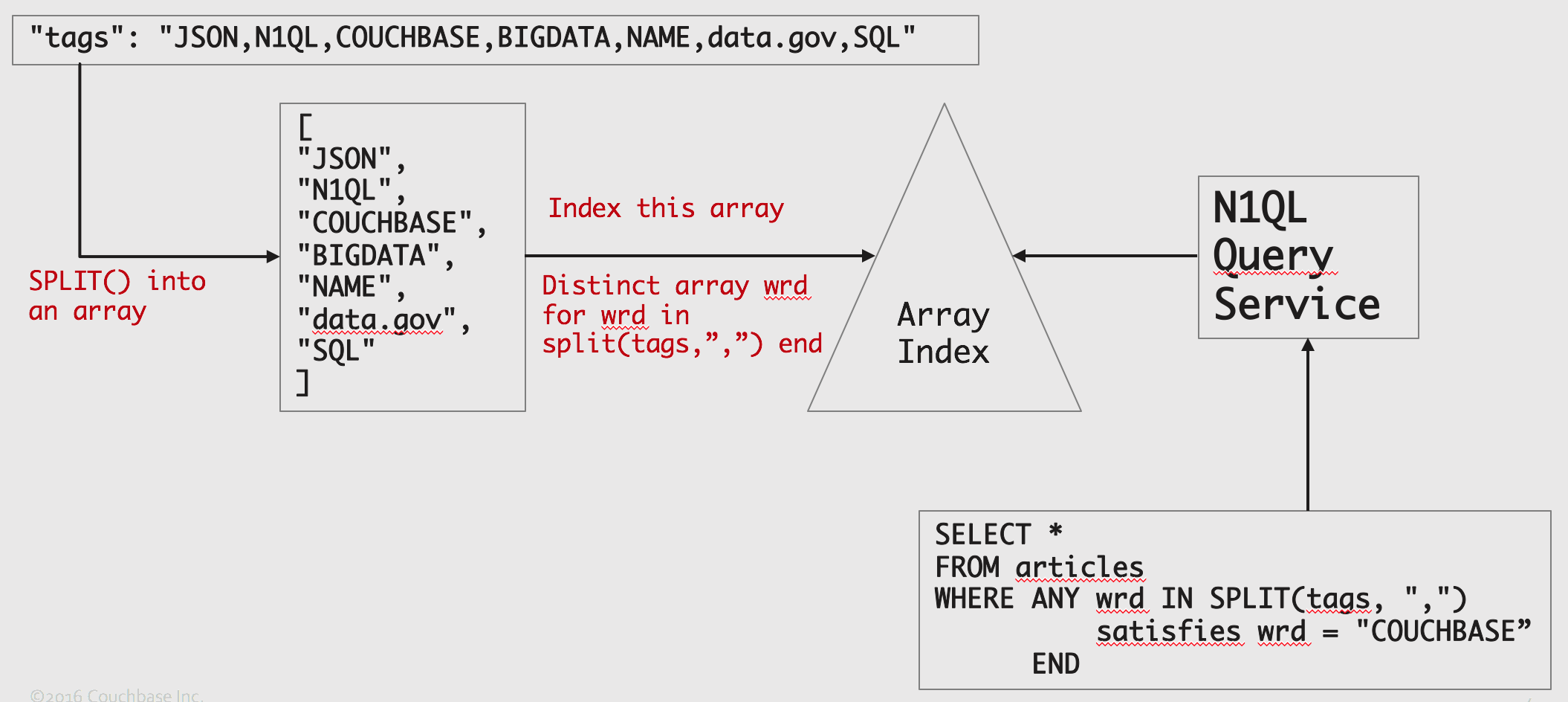
Now, we’ve converted the problem from string search to array look up.  Couchbase 4.5 has a flexible array indexing capability to index arrays. Exploiting this, we can look up the value in the array index very efficiently.
Here's the approach:
Image title
Let’s try this end-to-end example on Couchbase 4.5 or above.
1. Create a bucket called articles.
2. CREATE primary index
CREATE PRIMARY INDEX ON articles;
3. INSERT the following documents.
INSERT INTO articles(KEY, VALUE) VALUES(“k1”, 
{ "tags": "JSON,N1QL,COUCHBASE,BIGDATA,NAME,data.gov,SQL",
"title": "What's in a New York Name? Unlock data.gov Using N1QL "
}),
VALUES(“k2”, 
        {
            "tags": "TWITTER,NOSQL,SQL,QUERIES,ANALYSIS,HASHTAGS,JSON,COUCHBASE,ANALYTICS,INDEX",
            "title": "SQL on Twitter: Analysis Made Easy Using N1QL"
        }),
VALUES(“k3”, 
        {
            "tags": "CONCURRENCY,MONGODB,COUCHBASE,INDEX,READ,WRITE,PERFORMANCE,SNAPSHOT,CONSISTENCY",
            "title": "Concurrency Behavior: MongoDB vs. Couchbase"
        }),
VALUES(“k4”, 
        {
            "tags": "COUCHBASE,N1QL,JOIN,PERFORMANCE,INDEX,DATA MODEL,FLEXIBLE,SCHEMA",
            "title": "JOIN Faster With Couchbase Index JOINs"
        }),
VALUES (“k5”,
        {
            "tags": "NOSQL,NOSQL BENCHMARK,SQL,JSON,COUCHBASE,MONGODB,YCSB,PERFORMANCE,QUERY,INDEX",
            "title": "How Couchbase Won YCSB"
        });
4.  CREATE the ARRAY INDEX
CREATE INDEX `itagarray` ON `articles`
((DISTINCT (ARRAY `wrd` FOR `wrd` IN SPLIT(`tags`, ",") END)))
5.  Let’s query the data now.
EXPLAIN SELECT articles.* 
FROM articles
WHERE ANY wrd in SPLIT(tags, ",") SATISFIES wrd = "COUCHBASE" END;
This explain shows the array index is used and the spans created for the index scan.
                   {
                        "#operator": "DistinctScan",
                        "scan": {
                            "#operator": "IndexScan",
                            "index": "itagarray",
                            "index_id": "266223a6846cac2b",
                            "keyspace": "articles",
                            "namespace": "default",
                            "spans": [
                                {
                                    "Range": {
                                        "High": [
                                            "\"COUCHBASE\""
                                        ],
                                        "Inclusion": 3,
                                        "Low": [
                                            "\"COUCHBASE\""
                                        ]
                                    }
                                }
                            ],
                            "using": "gsi"
                        }
                    },
Let’s get greedy. Now that we have an efficient way to look up the tags, let’s make it case insensitive.
1. Create the array index, but convert the data into lower case before you index it.
CREATE INDEX `itagarraylower` 
   ON `articles`
(DISTINCT ARRAY `wrd` FOR `wrd` IN SPLIT(LOWER(`tags`), ",") END);
2. Start querying.
EXPLAIN SELECT articles.* 
FROM articles
WHERE ANY wrd in SPLIT(LOWER(tags), ",") SATISFIES wrd = "couchbase" END;
                "~children": [
                    {
                        "#operator": "DistinctScan",
                        "scan": {
                            "#operator": "IndexScan",
                            "index": "itagarraylower",
                            "index_id": "3ace3e48e2124ffe",
                            "keyspace": "articles",
                            "namespace": "default",
                            "spans": [
                                {
                                    "Range": {
                                        "High": [
                                            "\"couchbase\""
                                        ],
                                        "Inclusion": 3,
                                        "Low": [
                                            "\"couchbase\""
                                        ]
                                    }
                                }
                            ],
                            "using": "gsi"
                        }
                    },
You can even put a LOWER expression on the tag you’re looking for to make the query generalized.
EXPLAIN SELECT articles.* 
FROM articles
WHERE 
    ANY wrd in SPLIT(LOWER(tags), ",") 
        SATISFIES wrd = LOWER("couchbase") 
    END;

More Use Cases

Tags aren’t the ONLY type of data stored in regular string pattern. Tags are NOT the only ones to benefit from the technique.  Here are some other examples:
  • Airline route information
“SFO:LAX:FLG:PHX:HOU:MCO”
  • Variable list of employee skills
“Java,C,C++,Python,perl”
  • CSV processing: Handling data import from CSV.
3RJA043,Acura Integra,Honda,GSR,172,189482,1996,,California
  • Hashtags search
#SQL#NoSQL#JSON#appdev#database#Optimizer#indexing

Conclusion

N1QL is designed to handle the flexible schema and structure of JSON.  Array indexing helps you to process and exploit arrays in useful ways.

References

Comments

Popular posts from this blog

Swami Vivekananda: The Monk That Nobody Sent to Chicago

  There’s a saying in Chicago: “We don’t want nobody that nobody sent.” This was the cold reception Swami Vivekananda faced when he arrived in the windy city in July 1893, determined to attend the World Parliament of Religions that September. He belonged to no organization, carried no letter of recommendation, his countrymen were nobody, and represented an alien religion to the Western world. As the days passed, his hope of attending the parliament dwindled. With money running out and the odds stacked against him, he left the Windy City and went to Boston, praying for a glimmer of opportunity.  Swamiji came to America to share India’s most profound gift: the wisdom of the Hindu sages, preserved through centuries of oral tradition and embodied by its monks. This was 1893, not 1993—India was under the British grip, its resources drained, and its spirit subdued. Swamiji’s mission was not just a cultural exchange; it was a bold step toward envisioning a future where India could re...

Why Should Databases Go Natural?

From search to CRM, applications are adopting natural language and intuitive interactions. Should databases follow? This article provides a strategic perspective. Amid the many technological evolutions in software and hardware (CISC/RISC, Internet, Cloud, and AI), one technology has endured:  Relational Database Systems   (RDBMS), aka SQL databases. For over 50 years, RDBMS has survived and thrived, overcoming many challenges. It has evolved and adopted beneficial features from emerging technologies like object-relational databases and now competes robustly with   NoSQL databases .  Today, RDBMS dominates the market, with four of the top five databases and seven of the top ten being relational. RDBMS has smartly borrowed ideas, like JSON support, from NoSQL, while NoSQL has also borrowed from RDBMS. NoSQL no longer rejects SQL. From a user perspective, all modern databases have SQL-inspired query language and a set of APIs. All applications manage the respective data...

iQ Interactive: Cool Things for Developers on Couchbase Capella iQ

  The landscape of software development is ever-evolving with the advent of new technologies. As we venture into 2023, natural language processing ( NLP ) is rapidly emerging as a pivotal aspect of programming. Unlike previous generations of tools that primarily aimed at enhancing coding productivity and code quality, the new generation of Artificial Intelligence ( GenAI ) tools, like iQ, is set to revolutionize every facet of a developer's workflow. This encompasses a wide range of activities: Reading, writing, and rewriting specifications Designing, prototyping, and coding Reviewing, refactoring, and verifying software Going through the iterative cycle of deploying, debugging, and improving the software Create a draft schema and sample data for any use case Natural language queries. Generate sample queries on a given dataset Fix the syntax error for a query Don't stop here. Let your imagination fly. Although the insights garnered from iQ are preliminary and should be treated ...