
- Capacity: You want increased capacity because a single node is unable to hold a big index.
- Query-ability: You want to avoid rewriting the query to work with manual partitioning of the index using a partial index.
- Performance: Single index is unable to meet the SLA.
To address this, Couchbase 5.5 introduces automatic hash partitioning of the index. You’re used to having bucket data hashed into multiple nodes. Index partitioning enables you to hash the index into multiple nodes as well. There is good symmetry.
Creating the index is easy. Simply add a PARTITION BY clause to the CREATE index statement.
This as the following meta data in the system:indexes. Note the new field partition with the hash expression. The HASH(`state`) is the basis on which the index logically named `customer`.`ih` are divided into a number of physical index partitions. By default, the number of index partitions is 16 and it can be changed by specifying the num_partition parameter. In the example above, we create eight partitions for the indexes `customer`.`ih`.
Now, issue the following query. You don’t need an additional predicate on the hash key for the query to use the index. The index scan simply scans all of the index partitions as part of the index scan.
However, if you do have an equality predicate on the hash key, the index scan detects the right index partition having the right range of data and prunes rest of the index nodes from the index scan. This makes the index scan very efficient.
Now, let’s look at how this index helps you with three things we mentioned before: Capacity, Queriability and Performance.
Capacity
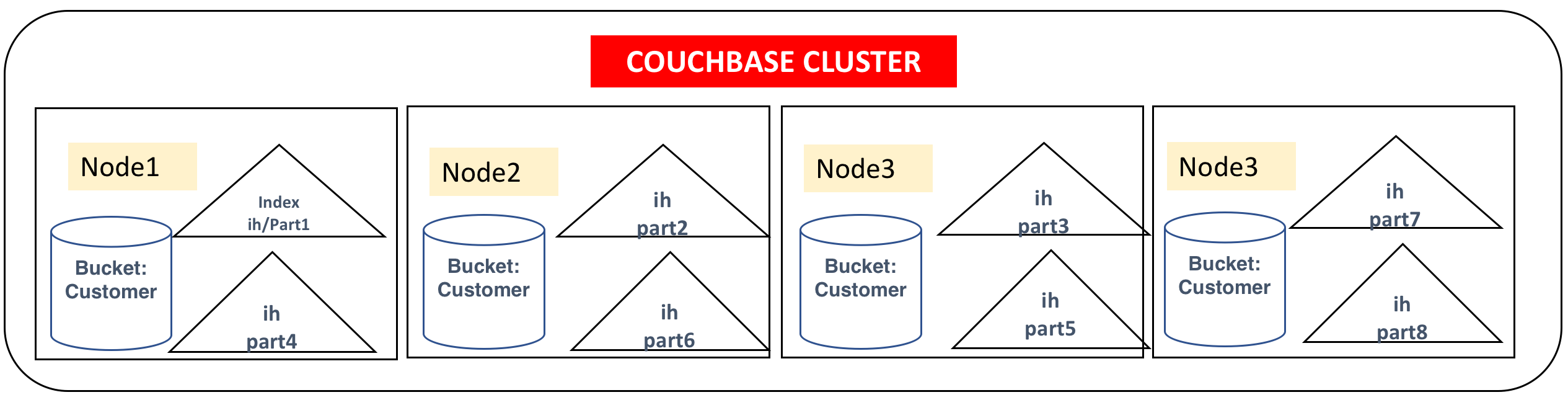
The query `customer`.`ih` will be partitioned to a specified number of partitions with each partition stored on one of the index nodes on the cluster. The indexer uses a stochastic optimization algorithm to determine how to distribute the partitions onto the set of indexer nodes based on the free resources available on each node. Alternatively, to restrict the index to a specific set of nodes, use the nodes parameter. This index will create eight index partitions and store four each on the four index nodes specified.
So, with this hash partitioned index, one logical index (`customer`.`ih`) will be partitioned into a number of physical index partitions (in this case, eight partitions) and give the query an illusion of a single index.
Because this index uses the multiple physical nodes, the index will have more disk, memory, and CPU resources available. Increased storage in these nodes makes it possible to create larger indexes.
You write your queries, as usual, requiring predicates only the WHERE clause (type = "cx") on at least on one of the leading index keys (e.g. name).
Query-ability
Let's talk about the limitations in the Couchbase 5.0 indexing.
Until Couchbase 5.0, you could manually partition the index like below. You had to partition them manually using the WHERE clause on CREATE INDEX. Consider the following indexes, one per state. By using the node parameter, you could place them in specific index nodes or the index will try to automatically spread out within the index nodes.
For a simple query with an equality predicate on state, it all works well.
There are two issues with this manual partitioning.
Consider the following, with a slightly complex predicate on the state. Because the predicate (state IN ["CA", "OR"]) is not a subset of any of the WHERE clauses of the index, none of the indexes can be used for the query below.
Secondly, if you get data to a new state, you’d be aware of it and create the index in advance.
If the field is a numerical field, you can use the MOD() function.
Even this work around each query block can only use one index and requires queries to be written carefully to match one of the predicates in the WHERE clause.
Solution
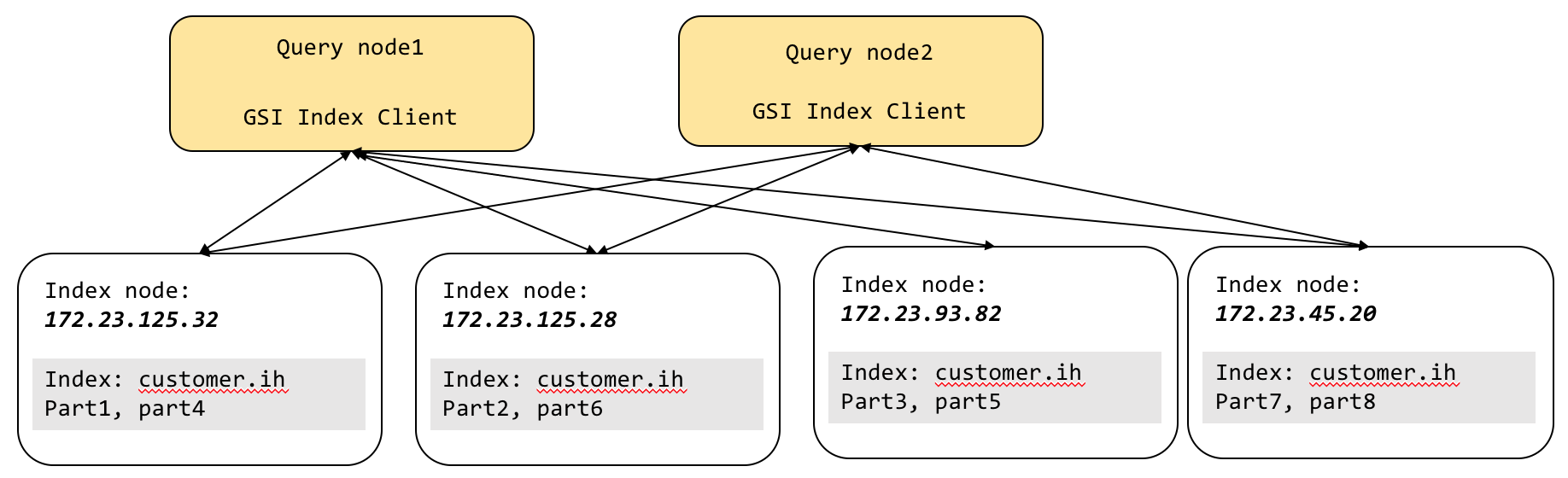
As you can see, the interaction between the query and index goes through the GSI client sitting inside each query node. Each GSI client gives the illusion of a single logical index (`customer`.`ih`) on top of eight physical index partitions.
The GSI client takes all of the index scan requests and then, using the predicate, tries to see if it can identify which of index partitions has the data needed for the query. This is the process of partition pruning (AKA partition elimination). For the hash-based partitioning scheme, equality and IN clause predicates get the benefit of partition pruning. All other expressions use the scatter-gather method. After the logical elimination, the GSI client sends the request to the remaining nodes, gets the result, merges the result, and sends the result back to query. The big benefit of this is that queries can be written without worrying about the manual partitioning expression.
The example query below does not even have a predicate on the hash key state. The below query does not get the benefit of partition elimination. Therefore, the GSI client issues scan to every index partition in parallel and then merges the result from each of the index scans. The big benefit of this is that queries can be written without worrying about the manual partitioning expression to match the partial index expression and still use the full capacity of the cluster resources.
Additional predicates on the hash key (state = “CA”) in the query below will benefit from partition pruning. For query processing, for simple queries with equality predicates on the hash key, you get uniform distribution of the workload on these multiple partitions of the index. For complex queries, including grouping and aggregation, we discussed above, the scans and partial aggregations are done in parallel, improving the query latency.
You can create indexes by hashing on one or more keys, each of which could be an expression. Here are some examples.
Performance
For a majority of database features, performance is everything. Without great performance proven by good benchmarks, the features are simply pretty syntax diagrams!
Index partitioning gives you improved performance in two ways.
- Scale-out. The partitions are distributed into multiple nodes, increasing the CPU and memory availability of for the index scan.
- Parallel scan. Right predicate giving queries the benefit of partition pruning. Even after the pruning process, scans of all the indexes are done in parallel.
- Parallel grouping and aggregation. This article explains the core performance improvement of grouping and aggregation using indexes.
- The parallelism of the index parallel scan and grouping and aggregation are determined by the
max_parallelismparameter. This parameter can be set per query node and/or query request.
Consider the following index and query:
The index is partitioned by HASH(state), but state predicate is missing from the query. For this query, we cannot do partition pruning or create groups within individual scans of the index partitions. Therefore, it will need a merge phase after the partial aggregation with the query (not shown in the explain).
Remember: These partial aggregations happen in parallel and therefore reduce the latency of the query.
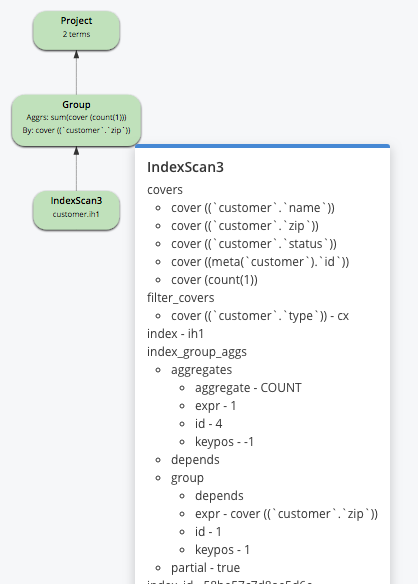
Consider the following index and query:
Example A:
In the above example, the group by is on the leading keys (state, city, zip) of the index and hash key (zip) is part of the group by clause. This will help the query to scan the index and simply created the required groups.
Example B:
In the above example, the group by is on the third key (zip) of the index and the hash key (zip) is part of the group by clause. In the predicate clause (WHERE clause), there is a single equality predicate on the leading index keys before the key zip (state and city). Therefore, we implicitly include the keys (state, city) in the group by without affecting the query result. This will help the query scan the index and simply created the required groups.
Example C:
In the above example, the group by is on the third key (zip) of the index and hash key (zip) is part of the group by clause. In the predicate clause (WHERE clause), there is a range predicate on city. The index key (city) is before the hash key (zip). So, we create partial aggregates as part of the index scan and the,n the query will merge these partial aggregates to create the final resultset.
Summary
Index partitioning gives you increased capacity for your index, better query-ability, and higher performance for your queries. By exploiting the Couchbase scale-out architecture, indexes improve your capacity, query-ability, performance, and TCO.
Comments
Post a Comment