
How Couchbase Won YCSB?


[This article is a repost of my article at DZone at: https://dzone.com/articles/how-couchbase-won-ycsb]

We chose to run YCSB and do the other performance work in Couchbase 4.5. Not because it's easy, but because it's hard; because that goal served us to organize and measure our effort and features and hold them to a high standard.
Like all the good benchmarksYCSB is simple to support and run. Most NoSQL can run YCSB benchmarks. The difficulty is in getting those numbers high. Just like the TPC wars in 90s, the NoSQL market is going through its YCSB wars to prove the performance and scalability.
Cihan Biyikoglu has discussed the combination of technologies within Couchbase helping customers scale and perform. In this article, we'll focus on Workload-E in YCSB — How Couchbase is architected and enhanced in Couchbase 4.5 to win this round of YCSB against MongoDB.
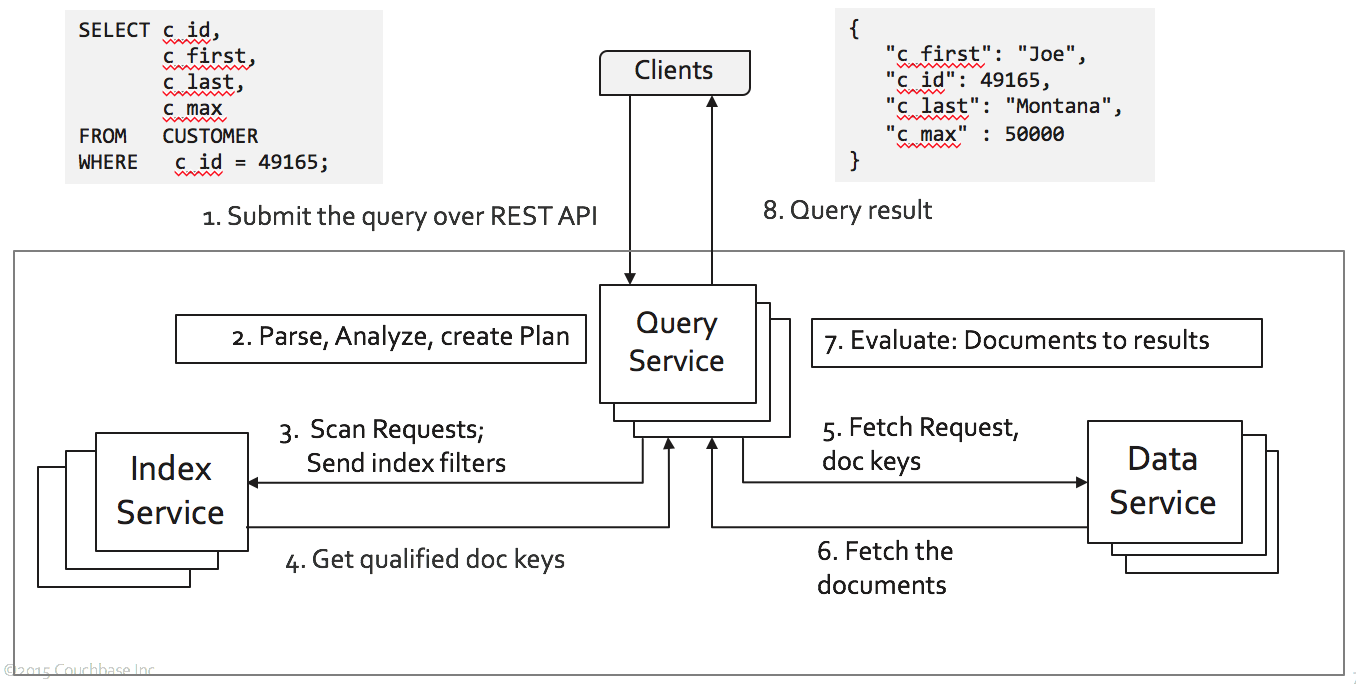
Image titleFigure 1 Couchbase Architecture.
To put it simply, Couchbase is a distributed database. Each of the critical services — Data, Query, Index — can be scaled up and scaled out. How you scale is your choice.
We used workload-A and workload-E to measure the performance. In this article, we'll focus on workload-E. The workload-E simulates queries for threaded conversations, where each scan is for the posts in a given thread (assumed to be clustered by thread ID). In all, 95% of the operations are scans and 5% of the operations are inserts to the database.
The short scan operations can be written in SQL with the following query:

SELECT field0, field1, field2, field3,
      field4, field5, field6, field7,
      Field8, field9
FROM  ycsb
WHERE primary_key > "xyz1028"
ORDER BY primary_key
LIMIT 50;


In Couchbase, the YCSB data is represented as the following:

DocumentKey:  "user4052466453699787802"
{
  "field0": "MVh1O1ZrIU9vJks1LSsu" ,
  "field1": "N1s7IS4kIlopJDkiKyN4" ,
  "field2": "M0phI0M3NVx5MlV3OTgi" ,
  "field3": "O1U7OFhvOEUtIEhhLj9g" ,
  "field4": "K1ozLSxuNi0oPSNkOyx+" ,
  "field5": "J0dxPzl+NyRiI1kzNj4k" ,
  "field6": "I0NrK1E/KyV2MjB4MVgh" ,
  "field7": "OT88IT5iOkYpOV1zJkkp" ,
  "field8": "IjtqIyE+P1ZnOjJuOSx0" ,
  "field9": "LEx3KjF+Ol0nLUo5M1tt"
}

The Couchbase port for YCSB is available at:https://github.com/brianfrankcooper/YCSB/tree/master/couchbase2
Below is the actual query in Couchbase. The meta().id expression in the query refers to the document key of the document. In Couchbase, each document in a bucket will have a unique key, referred to as document key.

SELECT field0, field1, field2, field3,
      field4, field5, field6, field7,
      Field8, field9xz
FROM  ycsb
WHERE meta().id >= "xyz1028"
ORDER BY meta().id
LIMIT 50;

Once you load the data, you simply create the following index. You're ready to run the YCSB workload E.

CREATE INDEX meta_i1 ON ycsb(meta().id);

When we ran this on Couchbase 4.0, we knew we had our work cut out. In this article, we'll walk through the optimizations done in 4.5 to improve this query. What we've done for this query applies to your index design, resource usage, and performance of your application queries.
In 4.5, when you execute this query, here is the plan used:

[
 {
   "plan": {
     "#operator": "Sequence",
     "~children": [
       {
         "#operator": "Sequence",
         "~children": [
           {
             "#operator": "IndexScan",
             "index": "meta_i1",
             "index_id": "bb26497ef8cf5fef",
             "keyspace": "ycsb",
             "limit": "50",
             "namespace": "default",
             "spans": [
               {
                 "Range": {
                   "Inclusion": 1,
                   "Low": [
                     "\"xyz1028\""
                   ]
                 }
               }
             ],
             "using": "gsi"
           },
           {
             "#operator": "Parallel",
             "maxParallelism": 1,
             "~child": {
               "#operator": "Sequence",
               "~children": [
                 {
                   "#operator": "Fetch",
                   "keyspace": "ycsb",
                   "namespace": "default"
                 },
                 {
                   "#operator": "Filter",
                   "condition": "(\"xyz1028\" <= (meta(`ycsb`).`id`))"
                 },
                 {
                   "#operator": "InitialProject",
                   "result_terms": [
                     {
                       "expr": "(`ycsb`.`field0`)"
                     },
                     {
                       "expr": "(`ycsb`.`field1`)"
                     },
                     {
                       "expr": "(`ycsb`.`field2`)"
                     },
                     {
                       "expr": "(`ycsb`.`field3`)"
                     },
                     {
                       "expr": "(`ycsb`.`field4`)"
                     },
                     {
                       "expr": "(`ycsb`.`field5`)"
                     },
                     {
                       "expr": "(`ycsb`.`field6`)"
                     },
                     {
                       "expr": "(`ycsb`.`field7`)"
                     },
                     {
                       "expr": "(`ycsb`.`Field8`)"
                     },
                     {
                       "expr": "(`ycsb`.`field9`)"
                     }
                   ]
                 }
               ]
             }
           }
         ]
       },
       {
         "#operator": "Limit",
         "expr": "50"
       },
       {
         "#operator": "FinalProject"
       }
     ]
   },
   "text": "SELECT field0, field1, field2, field3, \n       field4, field5, field6, field7,\n       Field8, field9\nFROM  ycsb\nWHERE meta().id >= \"xyz1028\" \nORDER BY meta().id\nLIMIT 50;"
 }
]

Each query goes thru multiple layers of execution within the query engine. The query engine orchestrates query execution among multiple indexes and data services, channeling the data through multiple operators.
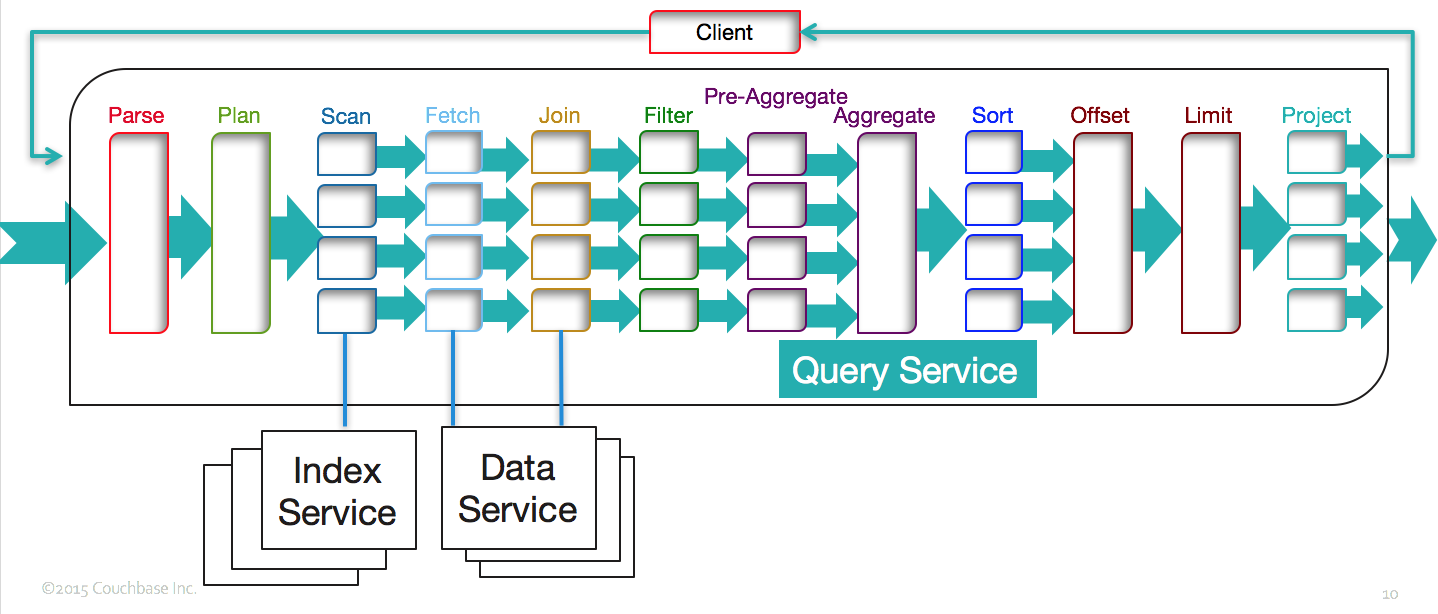
Image title
Let's take this and explain the performance optimizations, indexing features implemented, exploited to get the best performance

1. Index Scan

Here's the explain snippet on index scan. In this case, we use the index meta_i1, with a predicate specified by the spans and the index scan is expected to return the first 50 qualified keys.  Let's examine each of those decisions in in subsequent sections.
             "#operator": "IndexScan",
             "index": "meta_i1",
             "index_id": "bb26497ef8cf5fef",
             "keyspace": "ycsb",
             "limit": "50",
             "namespace": "default",
             "spans": [
               {
                 "Range": {
                   "Inclusion": 1,
                   "Low": [
                     "\"xyz1028\""
                   ]
                 }
               }
             ],
             "using": "gsi"
           },

2. Index Selection

Index selection in Couchbase is based on the predicates (filters) in the WHERE clause of the statement only. The index selection is made solely based on predicates and not any references to any other clauses like projection, grouping, ordering, etc.
In this statement, the WHERE clause is: meta().id >= "xyz1028". In this case, the match is quite straightforward.  The index meta_i1 is chosen.
This is the very basic case.  There are many subtle things about creating the right index and improving the throughput of the index scans.  Let's discuss one by one.
In Couchbase, you can create many types of indices. We now have a secondary index meta_i1 on the document key (meta().id).  In couchbase, you can create multiple indexes with same set of keys, but with different name.

CREATE INDEX meta_i2 ON ycsb(meta().id);
CREATE INDEX meta_i3 ON ycsb(meta().id);
CREATE INDEX meta_i4 ON ycsb(meta().id);
With these indices, the plan would choose the primary index, saving memory and CPU resources.
      {
         "#operator": "Sequence",
         "~children": [
           {
             "#operator": "IndexScan",
             "index": "primary_i1",
             "index_id": "23db838eab4b16ab",
             "keyspace": "ycsb",
             "limit": "50",
             "namespace": "default",
             "spans": [
               {
                 "Range": {
                   "Inclusion": 1,
                   "Low": [
                     "\"xyz1028\""
                   ]
                 }
               }
             ],
             "using": "gsi"
           },

3. LIMIT Pushdown

In pagination queries, it's typical to limit the results what the screen can show. OFFSET and LIMIT keywords in the query help you to paginate through the resultset. From the application point of view, OFFSET and LIMIT is on the resultset of the whole query after all the select-join-sort-project operations are done.
However, if the index scan is being used for filtering the data, data is already ordered on the index keys. Then, if the ORDER BY is on the index keys, ascending and in the same order as the index keys, we can exploit the index ordering to provide the results in the expected order. This is significant, without the pushdown, we need to retrieve all of the qualified documents, sort them and then choose the specific window of results to return.
The primary index matches the predicate in the query. The ORDER BY is ascending by default.  So, the predicate and the LIMIT is pushed down to the index scan. The plan includes the limit field with the number pushed down as well. When you want a high performing pagination queries, the LIMIT and OFFSET should be pushed down to the index scan.

SELECT field0, field1, field2, field3,
      field4, field5, field6, field7,
      Field8, field9xz
FROM  ycsb
WHERE meta().id >= "xyz1028"
ORDER BY meta().id
LIMIT 50;

      {
         "#operator": "Sequence",
         "~children": [
           {
             "#operator": "IndexScan",
             "index": "primary_i1",
             "index_id": "23db838eab4b16ab",
             "keyspace": "ycsb",
             "limit": "50",
             "namespace": "default",
             "spans": [
               {
                 "Range": {
                   "Inclusion": 1,
                   "Low": [
                     "\"xyz1028\""
                   ]
                 }
               }
             ],
             "using": "gsi"
           },

Another thing to notice is that, because the LIMIT is pushed down to index scan, the order, offset, limit operators become unnecessary and are removed from the plan.  The best optimizations simply avoid the work altogether. This is one of them.
If we didn't have this optimization in place, or when the ORDER BY does not follow the index key order, you'd see something like this in the query plan.
        {
         "#operator": "Order",
         "limit": "50",
         "offset": "2500",
         "sort_terms": [
           {
             "expr": "(meta(`ycsb`).`id`)"
           }
         ]
       },
       {
         "#operator": "Offset",
         "expr": "2500"
       },
       {
         "#operator": "Limit",
         "expr": "50"
       },
       {
         "#operator": "FinalProject"
       }
     ]

If the query has both OFFSET and LIMIT, the sum of both are pushed down and the query engine simply skips over the keys required by the OFFSET.
explain SELECT field0, field1, field2, field3,
      field4, field5, field6, field7,
      Field8, field9
FROM  ycsb
WHERE meta().id >= "xyz1028"
ORDER BY meta().id
OFFSET 2500
LIMIT 50;
             "#operator": "IndexScan",
             "index": "primary_i1",
             "index_id": "23db838eab4b16ab",
             "keyspace": "ycsb",
             "limit": "(2500 + 50)",
             "namespace": "default",

3. Index Scan Range

The index scan range specified the by the spans. For this query, the range is (meta().id >= "xyz1028") and is specified by the following.

"spans": [
               {
                 "Range": {
                   "Inclusion": 1,
                   "Low": [
                     "\"xyz1028\""
                   ]
                 }
               }
             ],

4. Type of the Index

In my cluster, I have the default standard global secondary index.  In the plan, we can see this in the field {"using": "gsi"}.  
Couchbase 4.5 introduces memory optimized index. A memory-optimized index uses a novel lock-free skiplist to maintain the index and keeps 100% of the index data in memory. A memory-optimized index has better latency for index scans and can also process the mutations of the data much faster. When you have memory optimized index, this will be{"using": "moi"}.

Summary

The duplicate indices, push down of the LIMIT, avoiding fetching extra keys from the index, avoiding sort — all done in a generalized way —helps optimize this YCSB scan query.  This will help general queries with your application queries as well.

Comments

Popular posts from this blog

Swami Vivekananda: The Monk That Nobody Sent to Chicago

  There’s a saying in Chicago: “We don’t want nobody that nobody sent.” This was the cold reception Swami Vivekananda faced when he arrived in the windy city in July 1893, determined to attend the World Parliament of Religions that September. He belonged to no organization, carried no letter of recommendation, his countrymen were nobody, and represented an alien religion to the Western world. As the days passed, his hope of attending the parliament dwindled. With money running out and the odds stacked against him, he left the Windy City and went to Boston, praying for a glimmer of opportunity.  Swamiji came to America to share India’s most profound gift: the wisdom of the Hindu sages, preserved through centuries of oral tradition and embodied by its monks. This was 1893, not 1993—India was under the British grip, its resources drained, and its spirit subdued. Swamiji’s mission was not just a cultural exchange; it was a bold step toward envisioning a future where India could re...

Why Should Databases Go Natural?

From search to CRM, applications are adopting natural language and intuitive interactions. Should databases follow? This article provides a strategic perspective. Amid the many technological evolutions in software and hardware (CISC/RISC, Internet, Cloud, and AI), one technology has endured:  Relational Database Systems   (RDBMS), aka SQL databases. For over 50 years, RDBMS has survived and thrived, overcoming many challenges. It has evolved and adopted beneficial features from emerging technologies like object-relational databases and now competes robustly with   NoSQL databases .  Today, RDBMS dominates the market, with four of the top five databases and seven of the top ten being relational. RDBMS has smartly borrowed ideas, like JSON support, from NoSQL, while NoSQL has also borrowed from RDBMS. NoSQL no longer rejects SQL. From a user perspective, all modern databases have SQL-inspired query language and a set of APIs. All applications manage the respective data...

iQ Interactive: Cool Things for Developers on Couchbase Capella iQ

  The landscape of software development is ever-evolving with the advent of new technologies. As we venture into 2023, natural language processing ( NLP ) is rapidly emerging as a pivotal aspect of programming. Unlike previous generations of tools that primarily aimed at enhancing coding productivity and code quality, the new generation of Artificial Intelligence ( GenAI ) tools, like iQ, is set to revolutionize every facet of a developer's workflow. This encompasses a wide range of activities: Reading, writing, and rewriting specifications Designing, prototyping, and coding Reviewing, refactoring, and verifying software Going through the iterative cycle of deploying, debugging, and improving the software Create a draft schema and sample data for any use case Natural language queries. Generate sample queries on a given dataset Fix the syntax error for a query Don't stop here. Let your imagination fly. Although the insights garnered from iQ are preliminary and should be treated ...